Role guide
Owner
Full visibility: exec dashboards, admin user management, every contract, every commission, every invoice.
- 01
Exec dashboard tour
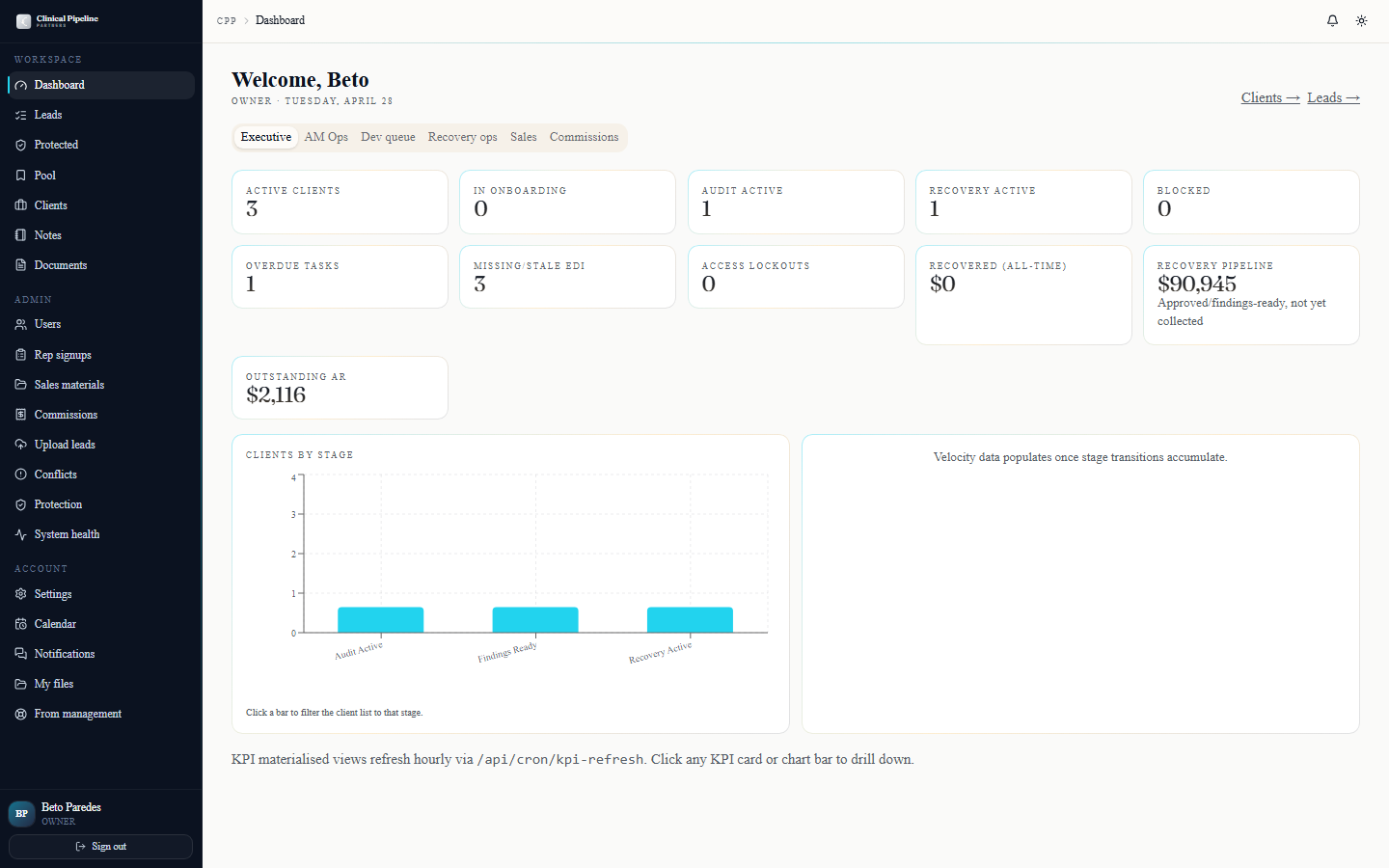
Sign in as owner and you land at /dashboard on the Exec tab. Five high-level KPI cards across the top:
Sign in as owner and you land at /dashboard on the Exec tab. Five high-level KPI cards across the top:
- Pipeline value — sum of all open opportunities by stage, CS + BMD broken out.
- MRR + run-rate — recovery revenue this month vs. last, plus a 90-day projection.
- Active clients — count by phase, with the slowest-moving phases red.
- Open commissions — total pending payouts to reps for the current month.
- System health — emails sent / failed today, cron job status, Supabase advisor warnings.
Below the KPIs is the drill-down strip — every card opens a focused panel with the underlying rows. Click "MRR" to see this month's recovery_entries grouped by client and payer; click "Active clients" for the phase-by-phase client list; etc.
Other tabs available to you (because owner sees everything): AM Ops, Dev queue, Recovery, Sales, Commissions. Switch tabs to drop into any role's view.
- 02
Admin user management
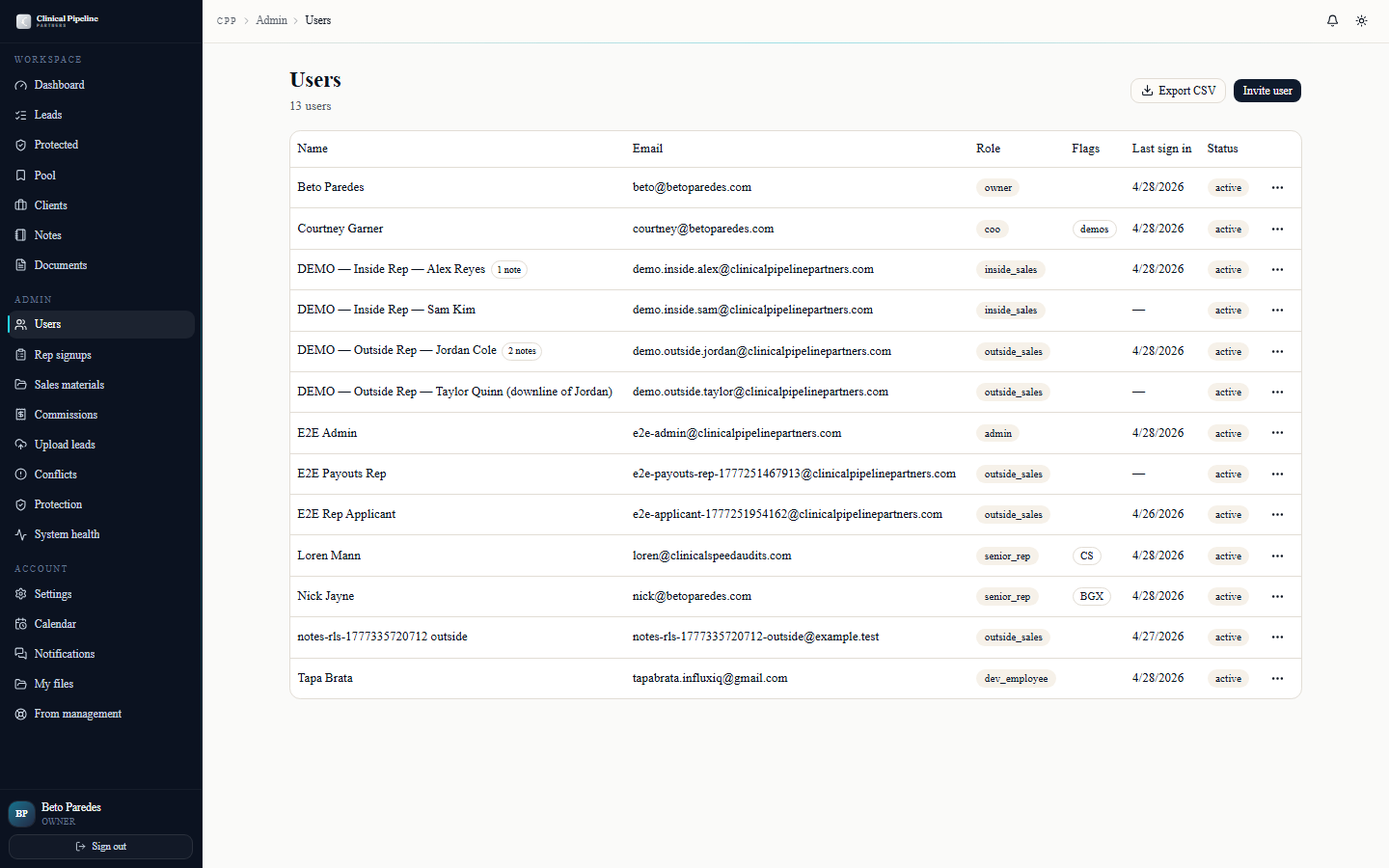
/admin/users is the user roster. Filterable by role, sortable by created date, searchable by name or email. Click any user for the detail page.
/admin/users is the user roster. Filterable by role, sortable by created date, searchable by name or email. Click any user for the detail page.
The detail page surfaces:
- Role + flags — change role, toggle senior-rep flags (CS / BMD), flip
can_run_demos. Saves immediately with an audit trail. - Last sign-in — most-recent successful auth, with the IP for the session.
- Notes from management — three-tier visibility thread on this user. Admin notes only you (and other admins) see; senior_management notes Loren and Courtney see; shared notes the user themselves sees.
- Files — anything shared with this user. Drag to upload more.
- Actions — resend magic-link invite, force password reset, deactivate.
Deactivating a user revokes their session immediately and prevents future sign-in, but preserves all their historical leads, notes, and files for audit. To fully delete (rare; only used for spam signups), use the SQL console — there's no delete button by design.
- Role + flags — change role, toggle senior-rep flags (CS / BMD), flip
- 03
ZoomInfo lookup
CPP supports a provider-abstracted enrichment layer. The default ENRICHMENT_PROVIDER is manual — meaning leads are entered by hand.…
CPP supports a provider-abstracted enrichment layer. The default
ENRICHMENT_PROVIDERismanual— meaning leads are entered by hand. Once a paid provider is wired (ZoomInfo or Apollo as fallback), every new CS lead pre-fills DM contacts from the lookup.The lookup surface lives on the new-lead form (/leads/new): a "Look up" button next to the facility name field hits the configured provider, returns the top 5 candidate decision-makers, and lets you pick one to pre-fill the DM block.
Until then the manual flow works the same — just no auto-fill. Reps type the DM details from their own research.
- 04
Invoice review
The monthly billing cron at /api/cron/monthly-billing runs at 05:00 UTC on the 1st of each month.…
The monthly billing cron at
/api/cron/monthly-billingruns at 05:00 UTC on the 1st of each month. It snaps every approved recovery_entry from the prior month into a per-client Net 7 invoice. Invoices land at/clients/{id}under the Invoices tab and aggregate at the admin-level invoice list.For each invoice review:
- Line items — every recovery_entry rolled in, with payer, identified/submitted/recovered amounts, and the snapped fee.
- Subtotal + total — auto-computed; should match the sum of fees.
- Late fee — evaluated by the late-fee cron (part of monthly billing). If the prior invoice is past Net 7, this invoice tacks on the late fee per the contract terms.
- Payment status — unpaid, paid, partial, on-hold. Updates manually as payments hit.
Click into any invoice for the full PDF preview. The Mark paid button captures payment date, amount, and method (ACH, wire, check). The system updates the client's recovery KPIs and the commissions engine sees the payment within the hour (next
/api/cron/kpi-refresh). - 05
Commission entry and marking paid
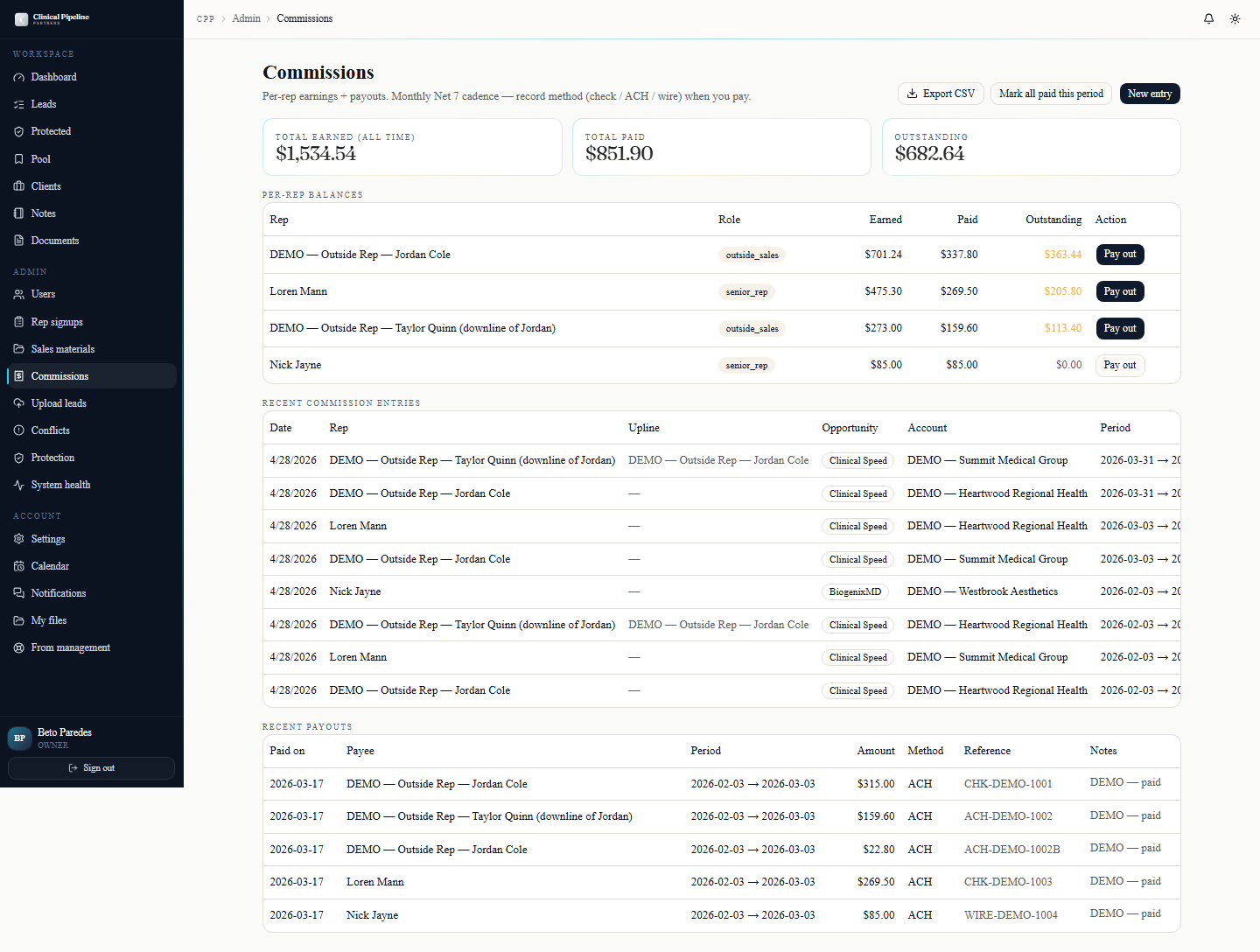
The monthly commissions cron at /api/cron/commissions runs at 06:00 UTC on the 1st (one hour after the billing cron, so invoices are settled first).…
The monthly commissions cron at
/api/cron/commissionsruns at 06:00 UTC on the 1st (one hour after the billing cron, so invoices are settled first). It computes each rep's payout based on:- Direct CS commission — 7% of recovered revenue on leads they own.
- CS downline override — 1% of their recruits' direct CS revenue.
- Direct BMD commission — 10% of BMD revenue on leads they own.
- BMD downline override — 5% of their recruits' direct BMD revenue.
Override is one level only — no override-on-override.
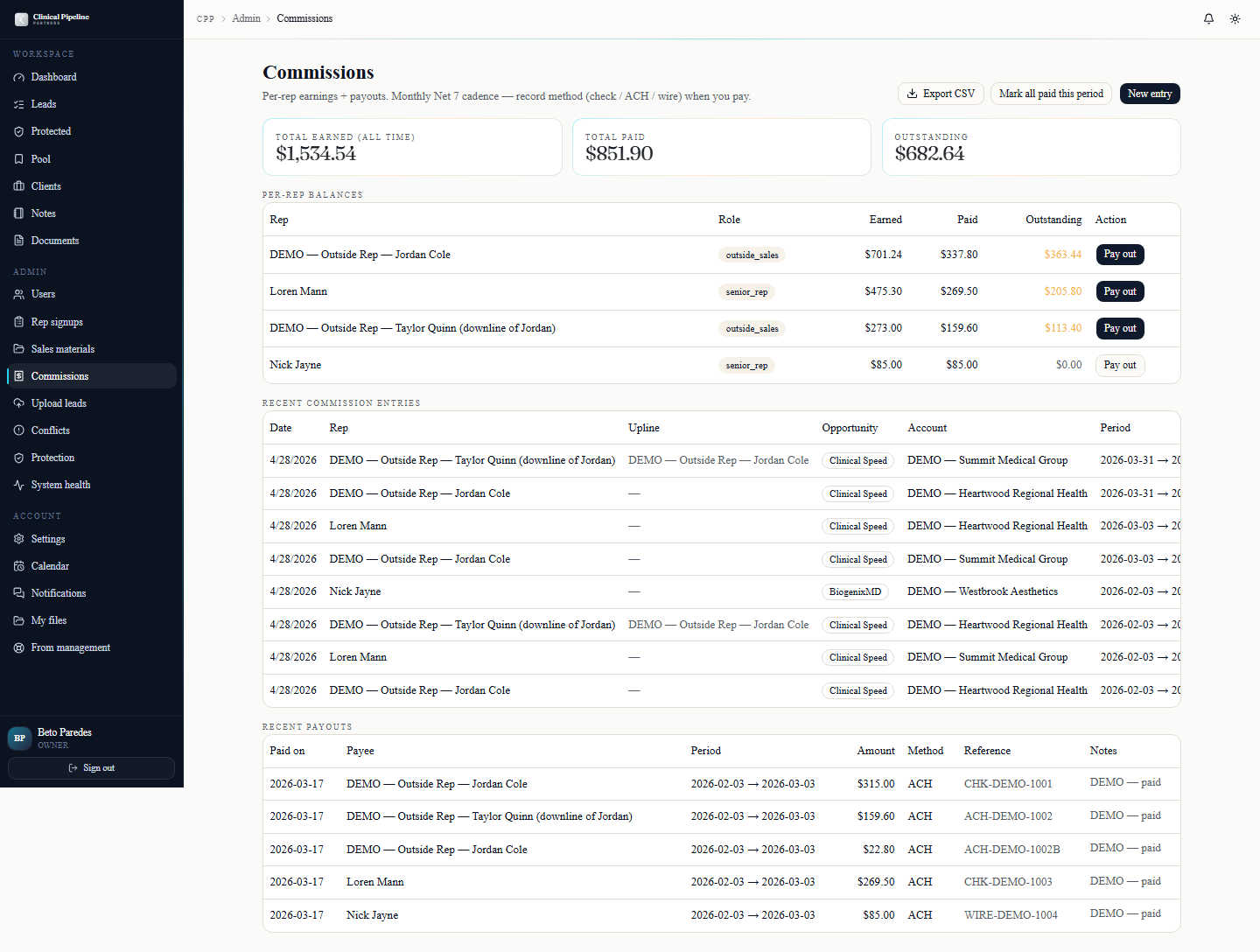
/admin/commissions is the admin payout queue. Each row is a rep + month + amount. Workflow:
- Review — open any row to see the line items: which leads, which clients, which recovery_entries contributed.
- Hold — flag a payout for a clawback or dispute. Optional reason. The rep sees "on hold — see admin" on their payouts page.
- Mark paid — capture date and method (ACH preferred). The rep's payouts page shows "paid" with the date.
Manual entry: /admin/commissions/new lets you create one-off payouts (referral bonus, spiff, special arrangement). These bypass the auto-snap and require you to specify rep + month + amount + reason.
- 06
Notifications, settings, and keyboard shortcuts
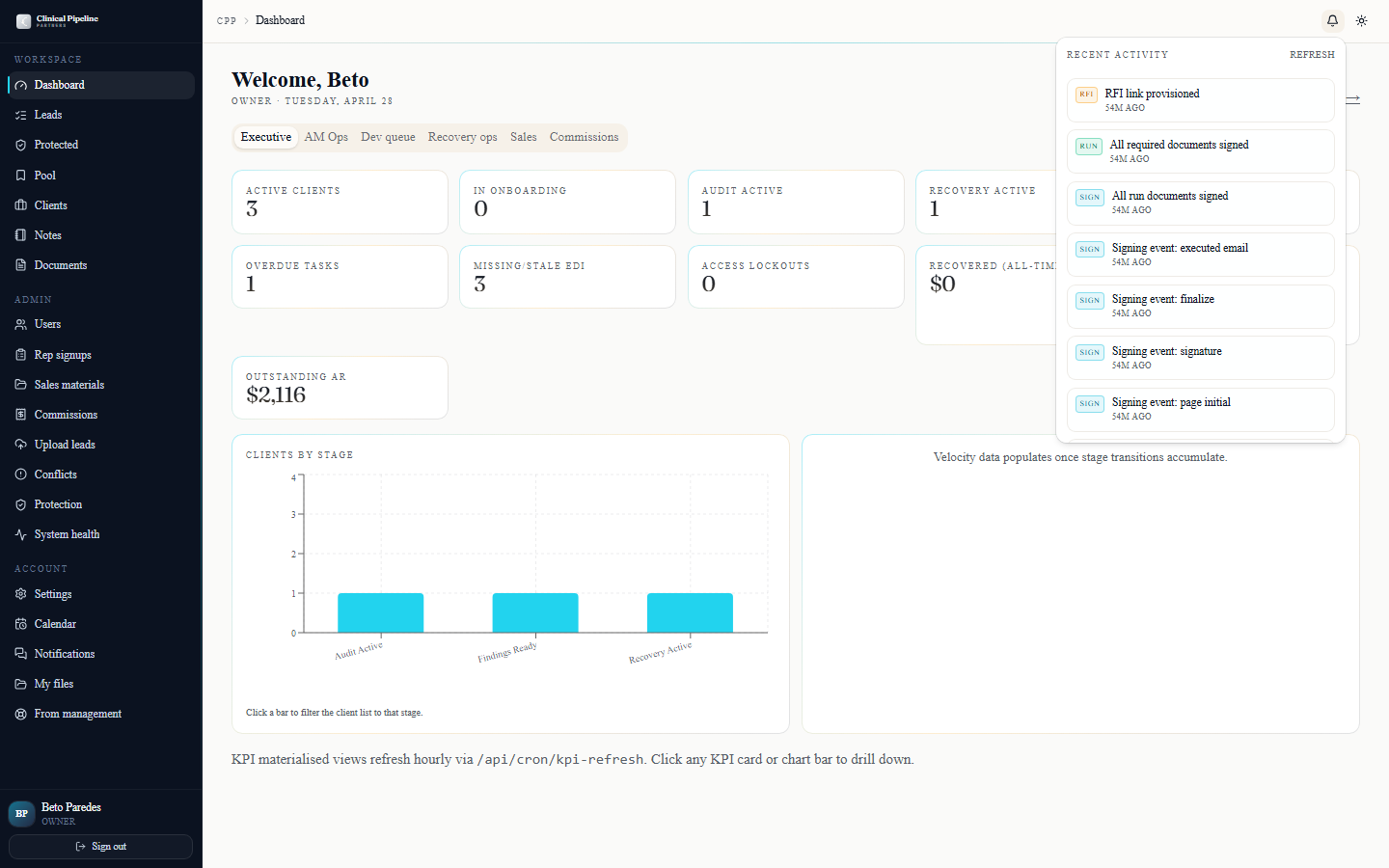
The bell icon in the TopBar opens a popover with the last 7 days of events relevant to owner — every signing-session lifecycle event, RFI submission, contract-run status flip, rep-…
The bell icon in the TopBar opens a popover with the last 7 days of events relevant to owner — every signing-session lifecycle event, RFI submission, contract-run status flip, rep-signup approval, and email queue alert. As owner you see the full surface; mute what's noise from
/settings.Open
/settingsto tune the noise. Three tabs:- Profile — display name, photo, default time zone.
- Email preferences — per-event-type opt-in toggles. Owner defaults are loud; trim down to the categories that need your eyes.
- Sessions & security —
Sign out everywhereworks today; full session listing is *Coming soon*.
Press `?` anywhere in the back office to open the keyboard-shortcuts modal — jump-to-search, new-lead, navigation jumps, and the disposition keys are all listed there.
- 07
Pull CSV exports for revenue review
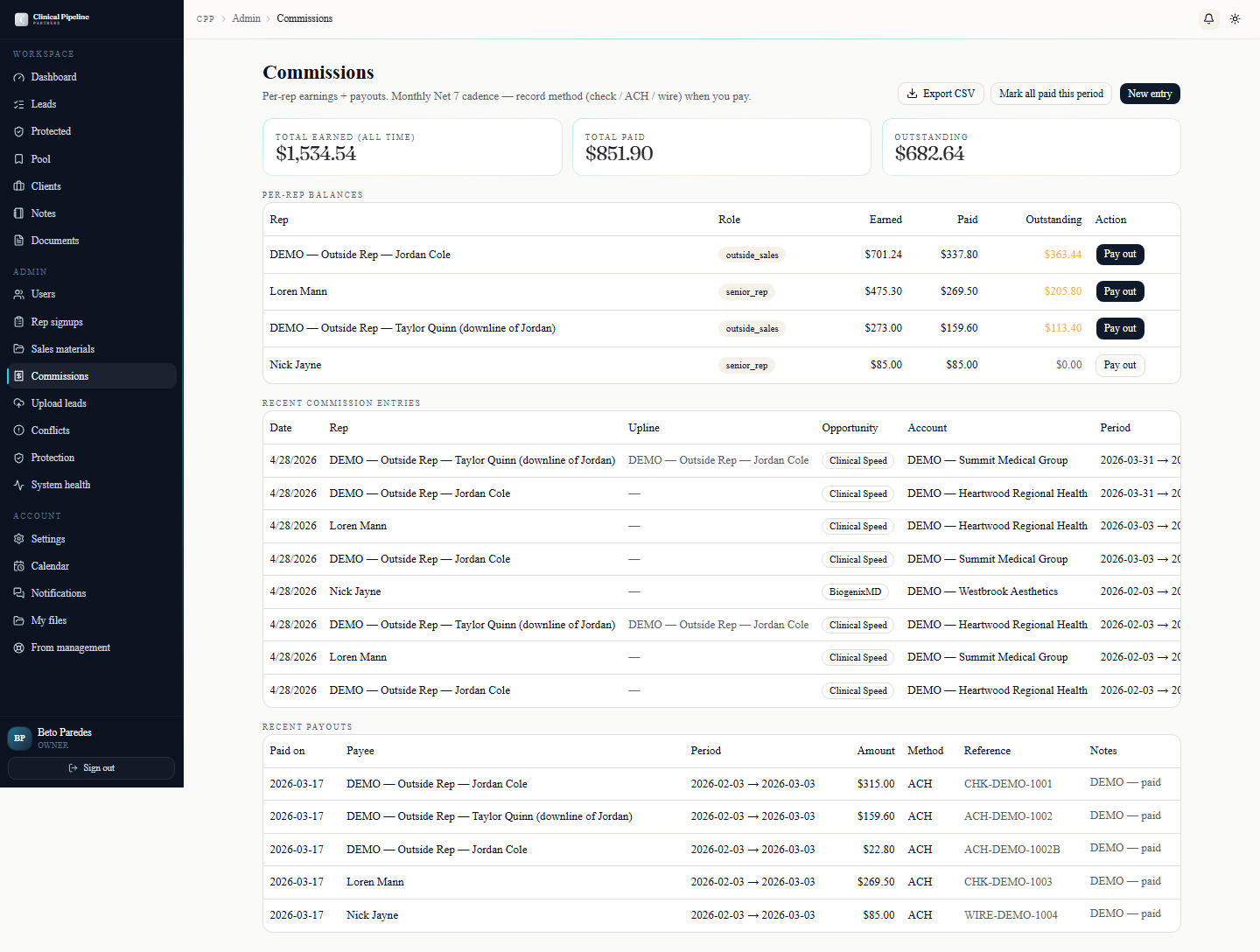
Every admin-facing list ships an Export CSV button in the page header that respects whatever filters and search terms are currently applied. As owner, the ones you'll actually use:
Every admin-facing list ships an Export CSV button in the page header that respects whatever filters and search terms are currently applied. As owner, the ones you'll actually use:
- /admin/commissions — pending and paid commissions with rep, client, fee snap, period, and payout date. Pair this with a recovery-entries pull to reconcile a month-end.
- Recovery entries (per-client) — recovery_entry rows with payer, identified / submitted / recovered amounts, and the immutable fee snap.
- /clients index — clients with phase, COO, AM, and recovery rollups. Useful as a 1-page snapshot for board updates.
- /admin/users — user list with role flags,
can_run_demos, last sign-in, and active status. - /leads index — full lead pipeline (RLS-scoped to owner = everything).
Exports are point-in-time and respect the same RLS policies that govern the live UI, so a CSV you hand off matches the numbers on screen. They're the cleanest way to ship Beto-side analysis to an outside accountant or to seed a one-off spreadsheet model.
- 08
Contract-run + system-health oversight
![The /contract-runs/[id] detail page from an owner view alongside the /system-health dashboard.](/instructions-img/owner/08-contract-runs-oversight.png)
You don't trigger contract runs (senior reps and the COO own that), but you have full read on every one.…
You don't trigger contract runs (senior reps and the COO own that), but you have full read on every one. Open
/contract-runs/[id]for any run to see live signing status, the reminder schedule indicator, and the same sender controls (Resend reminder now, Cancel send, Re-send RFI) the senior rep has — handy when a high-touch deal needs your hand.Adjacent surfaces worth a daily glance:
- /system-health — KPI cards (last cron runs, email queue depth, open rep signups, overdue deadlines) and a 7-day audit timeline. Admins own this page; owner reads it as a heartbeat.
- /leads/protected — the public protection list. Use
?expiring_soon=1to surface leads inside 7 days of expiry; pair with Export CSV for a board-ready snapshot. - Internal notes visibility — the 3-tier model (
shared_with_subject,senior_management,admin_only) is enforced everywhere notes appear. As owner you see all three tiers, including admin_only. - Prospect signing page at
/c/{token}— the public, JWT-gated 3-button surface where DMs sign Service or Pilot, BAA, and AoR. The Sign all in one round option walks them sequentially.
The signing-session lifecycle hook auto-fires when all required slots finalize: status flips to
signed, the senior rep + COO get the "Ready for onboarding scheduling" email, and the booking flow takes over.


![The /contract-runs/[id] detail page from an owner view alongside the /system-health dashboard.](/instructions-img/owner/08-contract-runs-oversight.webp)